What you'll need:
- A Jira Cloud site (any plan — Free, Standard or Premium)
- Jira admin rights to install the app (or a Jira admin willing to click one button for you)
- Optionally: a real AI system from your organization to register — a chatbot, a scoring model, a vendor tool with AI inside. Anything works.
- 1. Install the app (2 minutes)
- 2. Run the setup wizard (2 minutes)
- 3. Register your first model (2 minutes)
- 4. Classify it: compliance fields and presets (2 minutes)
- 5. Attach the evidence: documents and templates (1 minute)
- 6. See what the auditor sees: dashboard and reports (1 minute)
- 7. Next steps
1. Install the app (2 minutes)
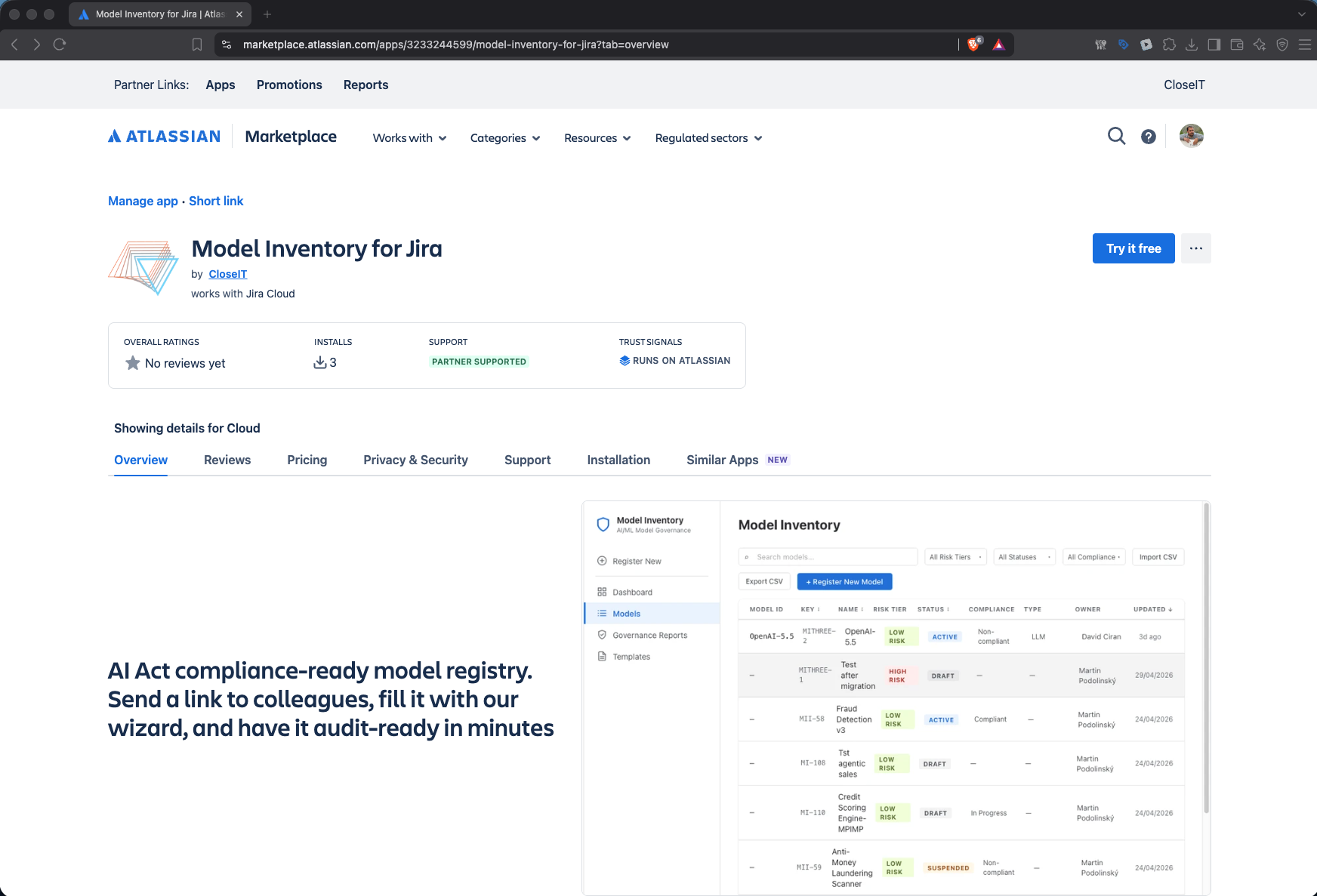
- Open the Model Inventory for Jira listing on the Atlassian Marketplace.
- Click Try it free and select your Jira site. This requires Jira admin rights — if that's not you, forward the listing link to your Jira admin; the install takes about 30 seconds.
- Once installed, open Model Inventory from the Apps menu in your Jira navigation.
The trial gives you the full Advanced edition for 30 days, so you can evaluate everything in this guide. Your data stays in your Jira — the app makes zero external calls and adds no new data processor.
2. Run the setup wizard (2 minutes)
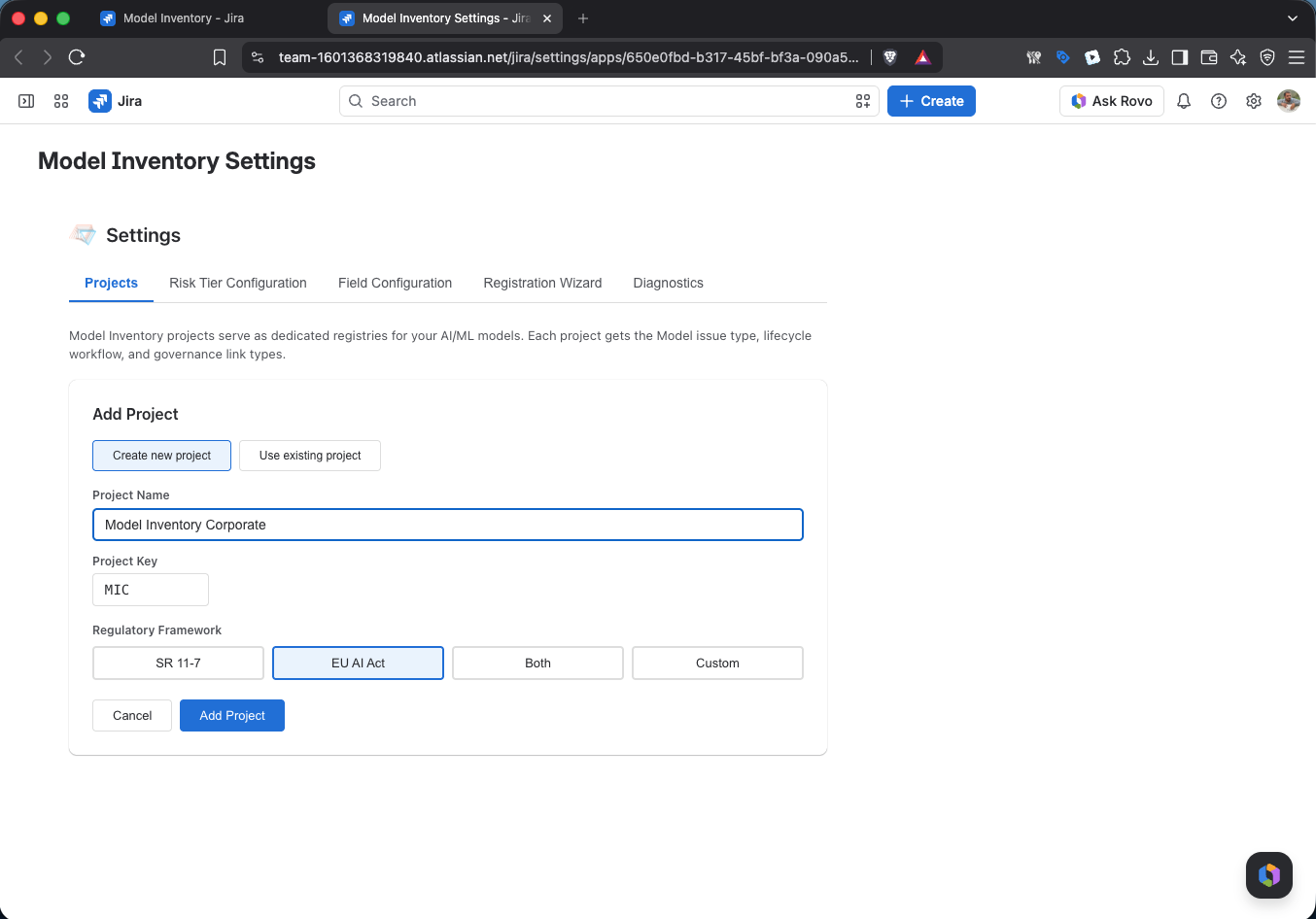
On first open, a guided setup wizard prepares your Jira for model governance — a dedicated issue type, the compliance field set, and a model lifecycle workflow. Two choices matter:
- Project — create a dedicated inventory project (recommended for evaluation) or use an existing one.
- Compliance framework — pick the preset that matches your world: EU AI Act, SR 11-7 (banking model risk management), or both. The preset tunes the risk tiering logic — it's not just a label.
Click through, let the wizard run, and you land in an empty registry.
Tip — see a mature registry before you build yours: in the app's admin settings, the Sample Data section populates an empty project with 14 realistic cross-industry AI models, complete with governance items and lifecycle history. One click to create, safe to explore, and your own project stays untouched if you keep the sample data in its own project.

3. Register your first model (2 minutes)
Every AI system you register becomes a Jira work item — with the change history, access control and search your team already knows.
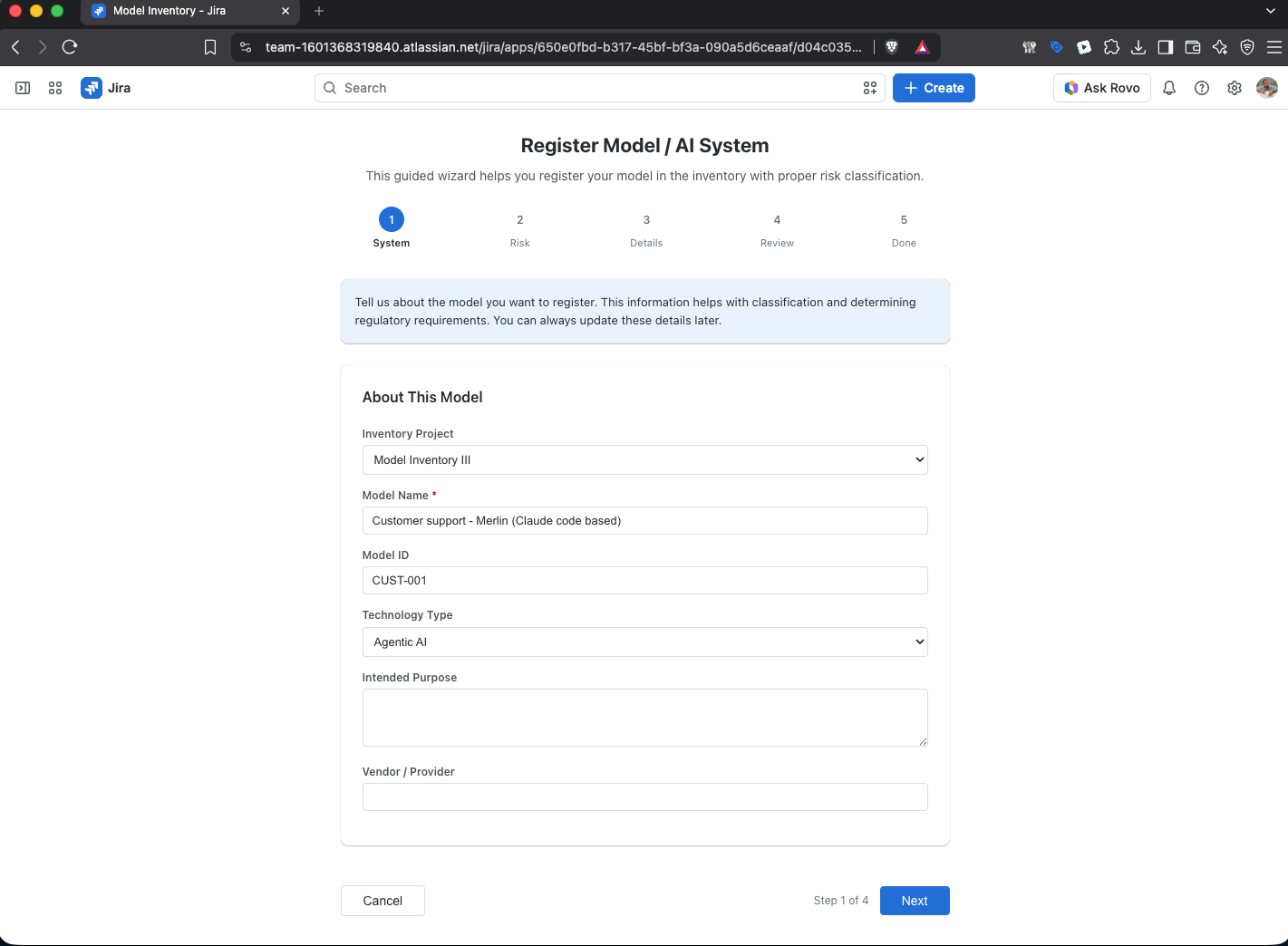
- In the sidebar, click Register New. The Register New Model form opens.
- Only one field is required: Model Name — e.g. "Customer Support Chatbot". We recommend also filling in:
- Description / intended purpose — what it does and what business problem it solves
- Business Owner — the person accountable for the system
- Save. Your first model is registered.
That's genuinely it for step one. The registry supports 24 compliance-ready fields (identification, ownership, data sensitivity, human oversight, regulatory scope and more — see the field-by-field guide for the full rationale), but you don't need to fill them all now. Start minimal, enrich as your governance process matures.
Already have an inventory in Excel? Use CSV import instead — your existing spreadsheet imports in one click, no row limit. And for firm-wide collection, share the guided registration wizard link: anyone with access to your Jira answers a few guided questions about their system — no compliance expertise needed — and it lands straight in your inventory.
4. Classify it: compliance fields and presets (2 minutes)
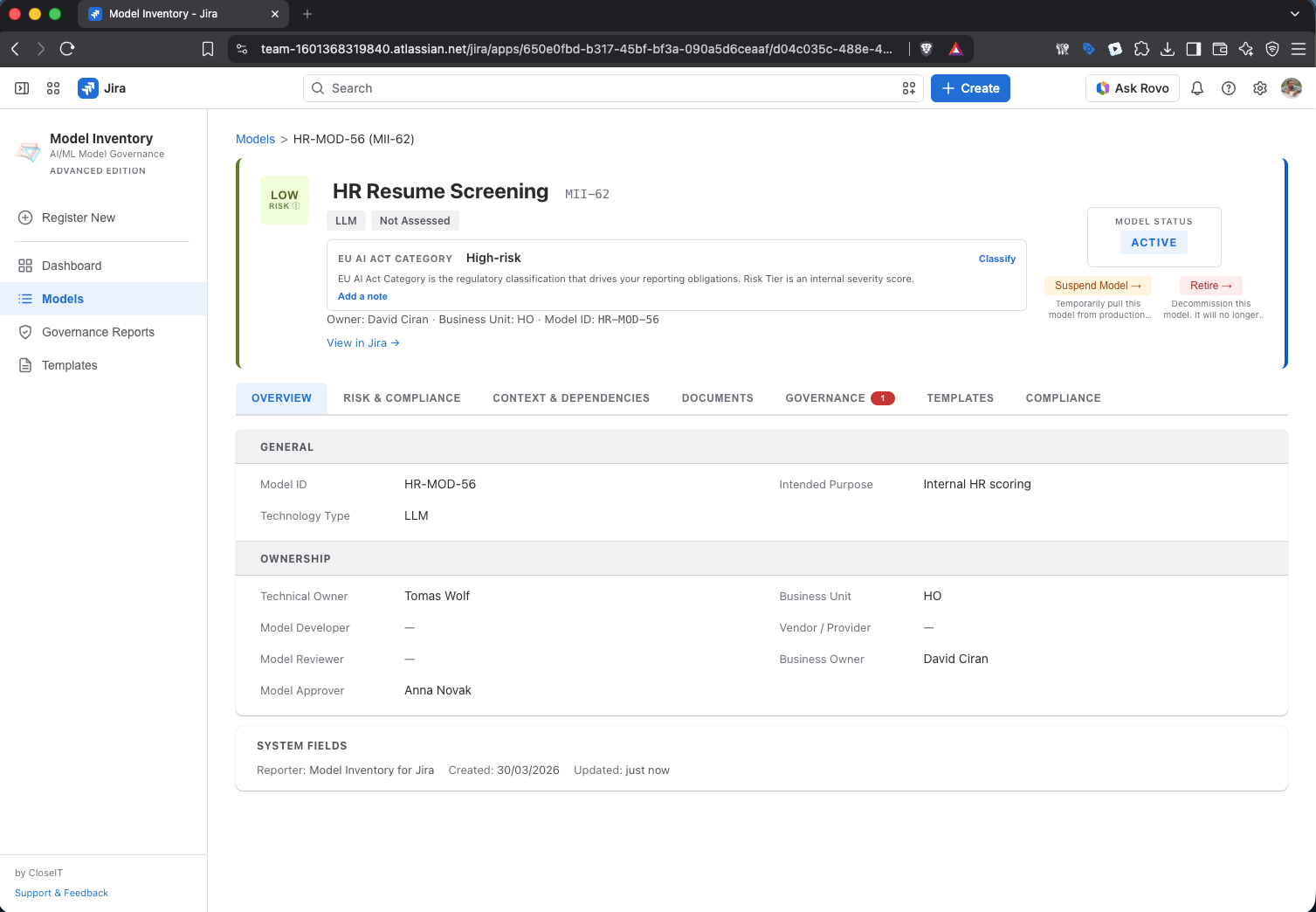
This is where an inventory becomes a compliance instrument. Open your newly created model and set:
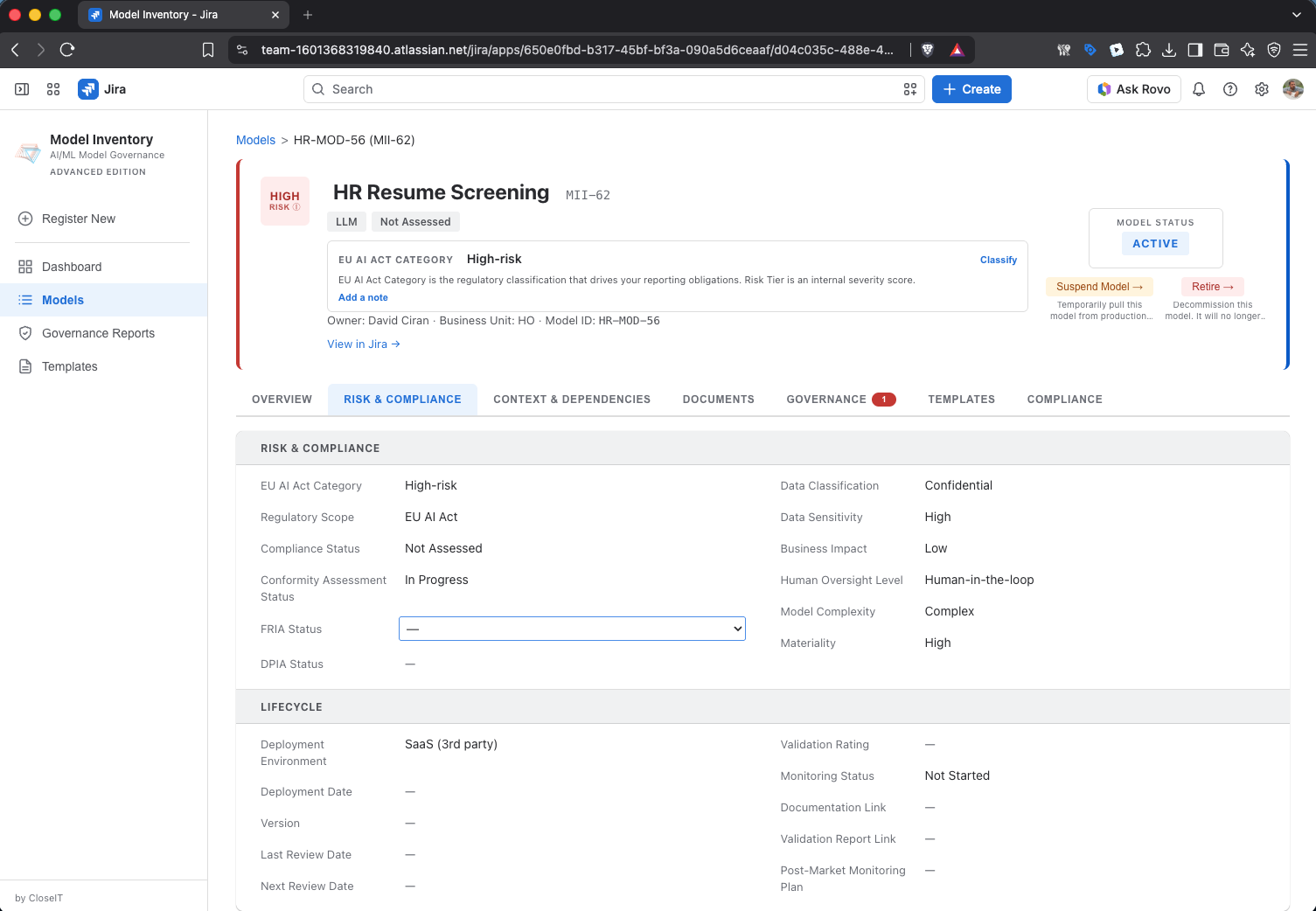
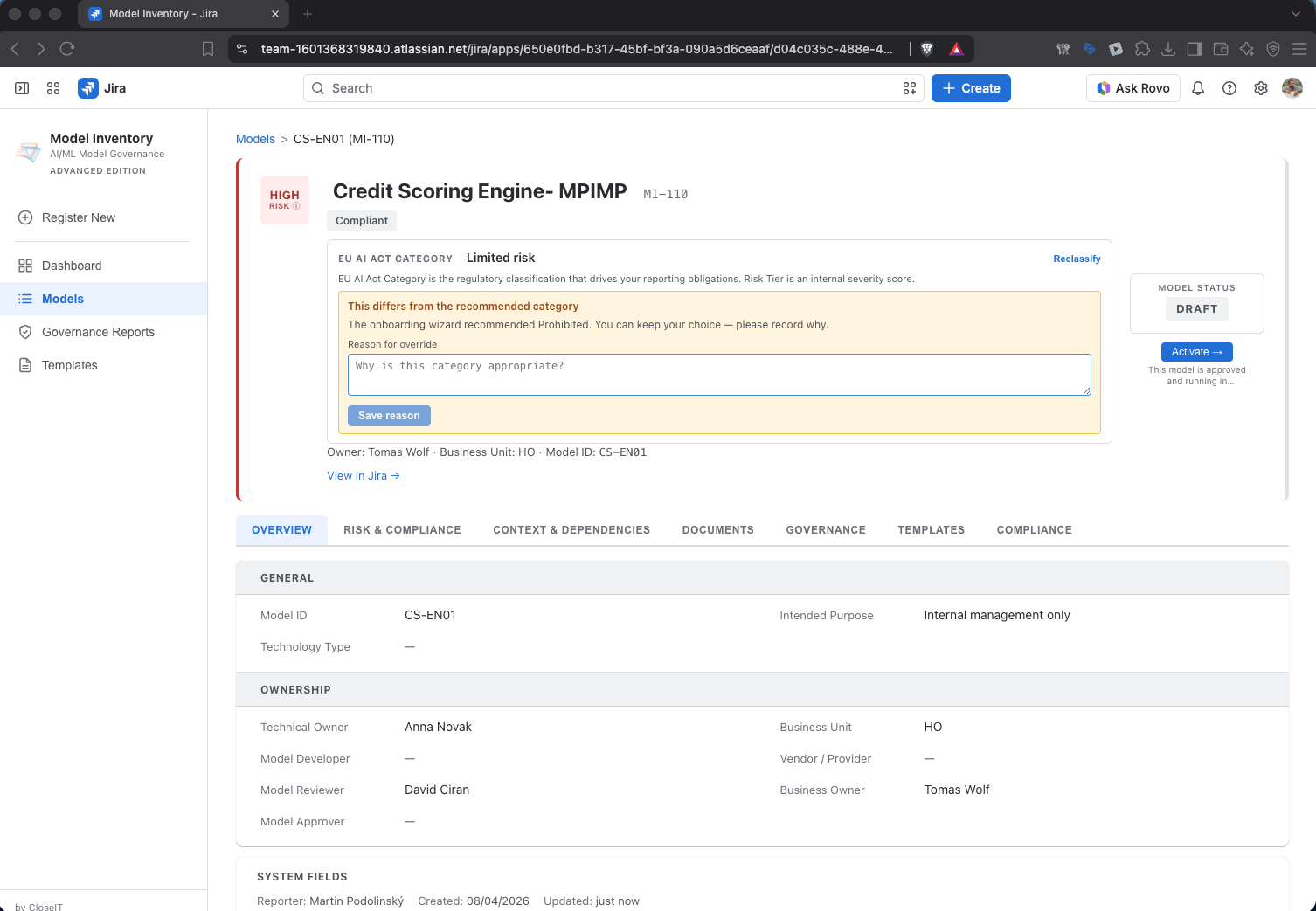
EU AI Act Category — classify the system under Article 6: Prohibited, High-risk, Limited risk or Minimal risk. Unsure? Run the guided EU AI Act classification from the model record — a short questionnaire (prohibited practices, Annex III areas, sector, oversight) suggests the category with reasons, and records your decision if you override it. Preset logic, not a blank template.
Risk tier — the internal risk tier is computed from the model's attributes (business impact, data sensitivity, human oversight level, model complexity) and recalculates automatically when inputs change. No manual "risk column" that goes stale. If you chose the SR 11-7 preset at setup, the tiering follows banking materiality conventions.
Lifecycle status — track each system through its lifecycle: Draft → Active → Suspended → Retired, native Jira workflow transitions (Deploy, Suspend, Reactivate, Retire). Regulators expect you to track retired systems too — a "retired" model still running on a forgotten server is a compliance gap.
A note for regulated industries: Model Inventory for Jira is built by the team behind Model Governance Suite, an enterprise model governance platform in production at a European Tier-1 bank since 2019. The field model, risk tiering logic and governance workflows come from seven years of real-world model risk management under SR 11-7 / SR 26-2 discipline — not from a framework whitepaper. If your validators ask where the tiering logic comes from, that's the answer.
5. Attach the evidence: documents and templates (1 minute)
Advanced edition features — included in your trial.
An inventory tells the regulator what you have. Evidence proves what you did about it. Two places where they meet:
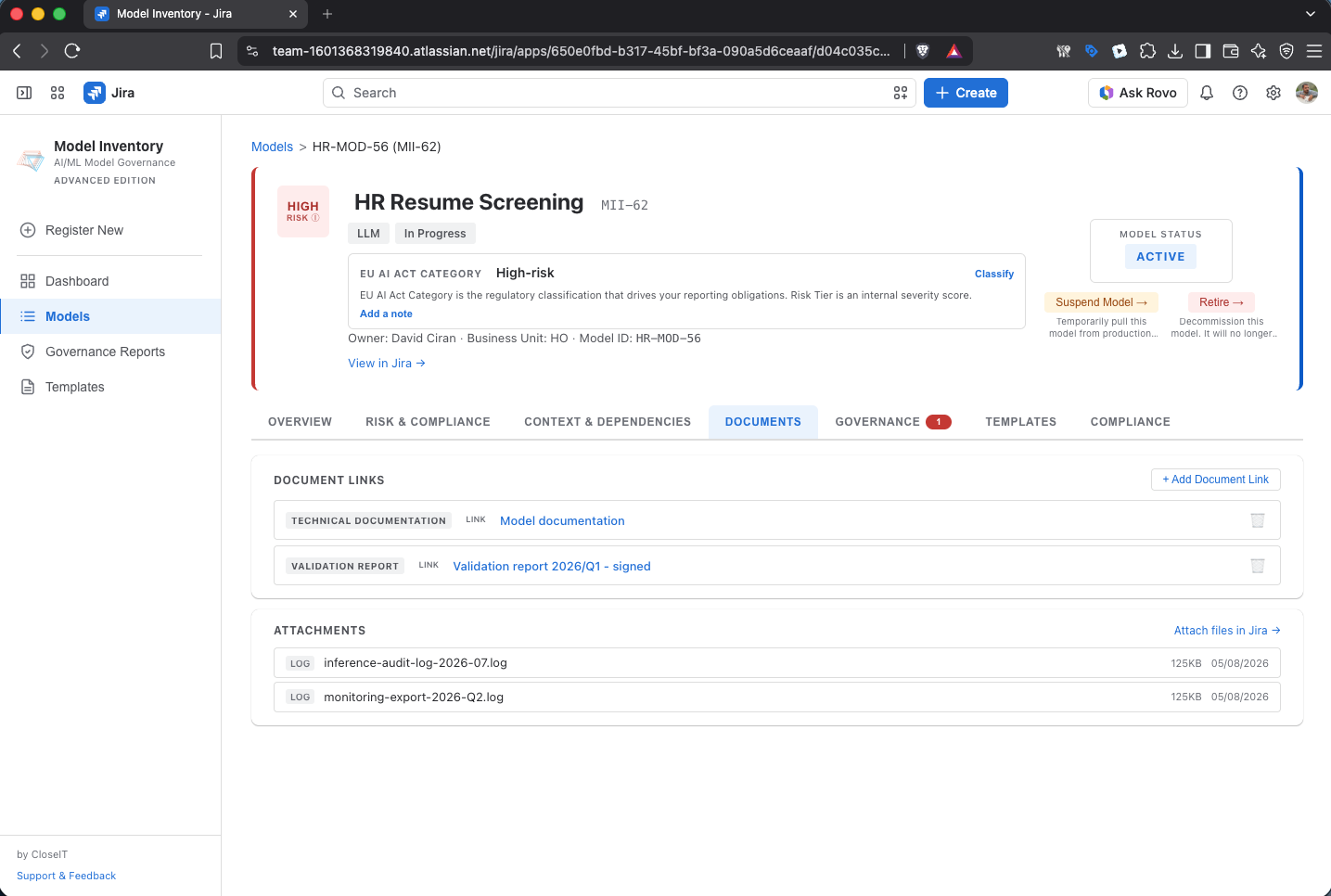
- The Documents tab on each model record: click Add Document Link and link existing documentation — technical docs, risk assessments, validation reports, a FRIA or DPIA. Any URL works: Confluence pages, SharePoint, external systems. Documents keep living where they live; the model record becomes the index that keeps them from getting orphaned.
- Templates: generate governance documents — an AI Governance Policy or a FRIA (Fundamental Rights Impact Assessment) — with guided wizards pre-filled from your model data, then export as an MS Word document. And if a model is classified High-risk, the app flags that a FRIA is legally required before deployment (Art. 27) — so the obligation can't slip by unnoticed.
For your evaluation: link one document — even a placeholder page — to your test model. Then open the model record and imagine an auditor looking at it: system, classification, owner, and evidence, one screen.
6. See what the auditor sees: dashboard and reports (1 minute)
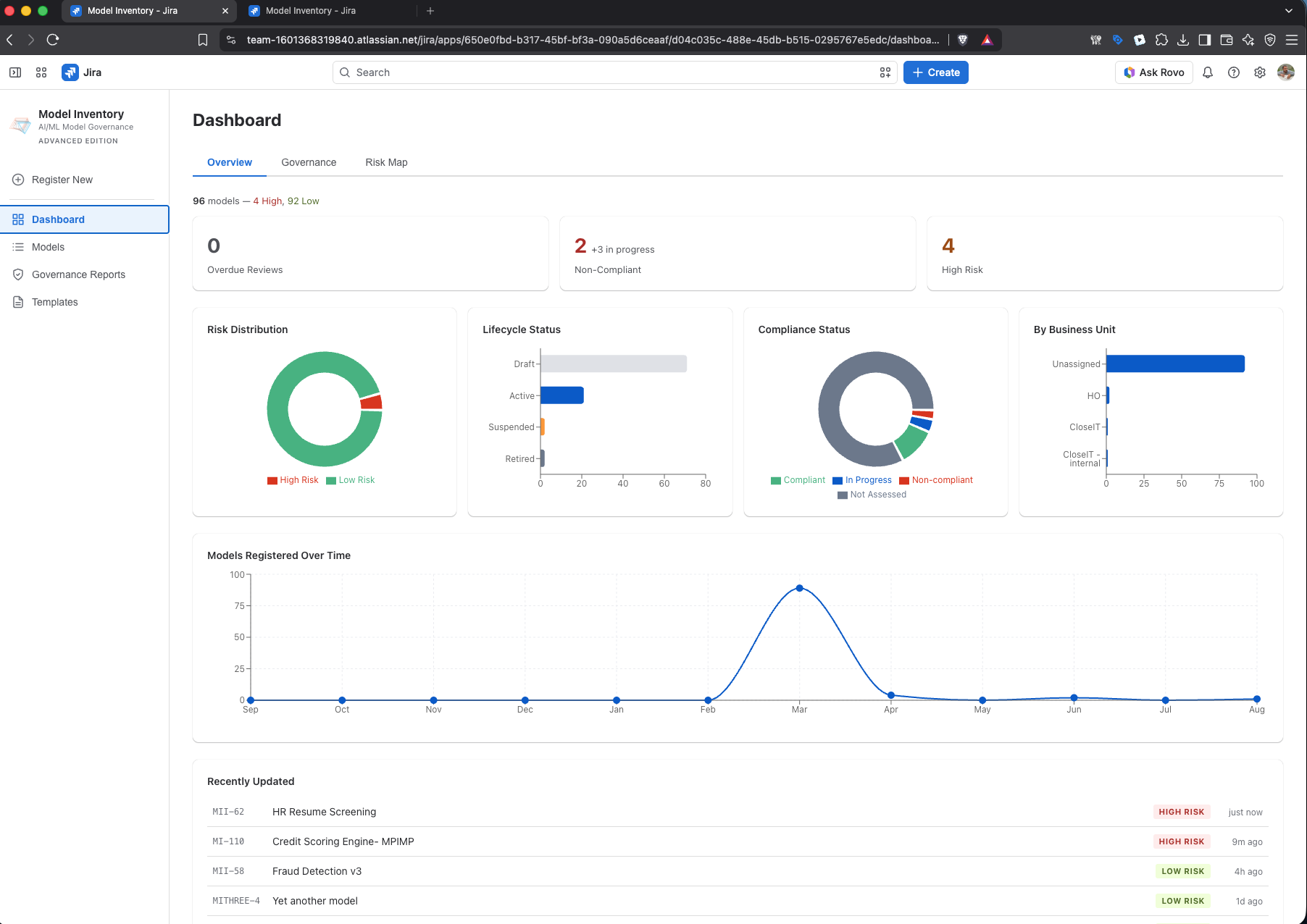
Open the Dashboard. This is the view that answers the questions boards and regulators actually ask:
- How many AI systems do we run? Portfolio count, at a glance.
- What's our risk exposure? Risk distribution, EU AI Act categories, compliance status, lifecycle breakdown.
- Where is the governance work? The Governance and Risk Map tabs (Advanced — in your trial) show pending and overdue reviews, open conditions, and a portfolio risk heat map. Governance Reports in the sidebar goes deeper.
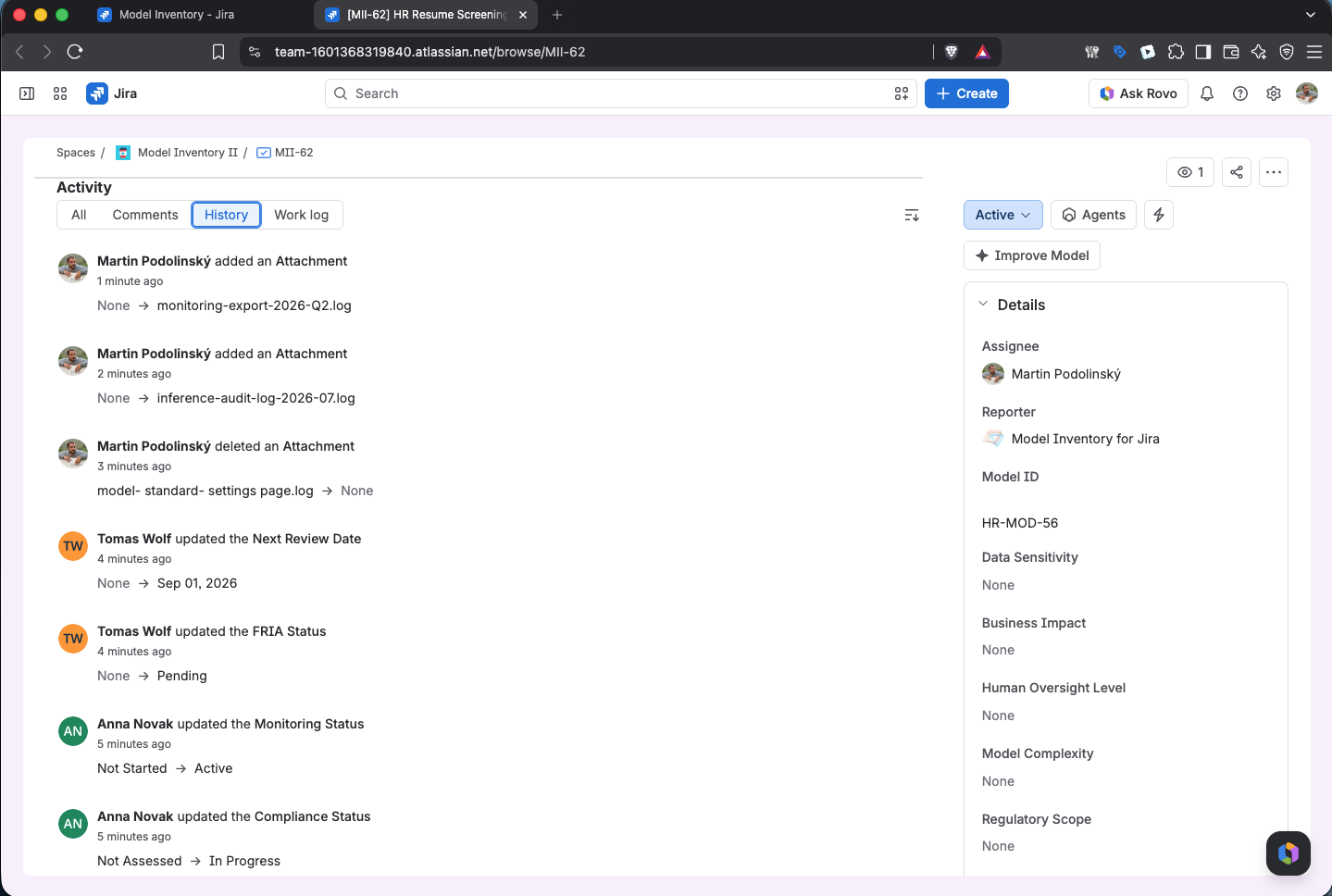
The part that's easy to miss: because every model is a Jira work item, every value on this dashboard is backed by an immutable change history. When the regulator asks "who changed this risk classification and when," the answer is one click away — not a forensic exercise across spreadsheet copies.
7. Next steps
You've now seen the full loop: register → classify → attach evidence → report. Here's how to turn the evaluation into a rollout:
Make the most of your trial:
- Register 5–10 real systems from your organization — the evaluation gets real the moment the models are yours. Use the CSV import if you have an existing sheet.
- Share the registration wizard link with two or three colleagues who own AI systems. Distributed collection is the part spreadsheets can't do — test it early.
- Walk your compliance owner through the dashboard. If EU AI Act is your driver: high-risk obligations under Annex III apply from December 2, 2027, but the prohibitions and AI literacy duties already apply — and the inventory is step zero for everything else.
Beyond this guide: the complete product documentation — every screen, field reference, workflows and administration — lives in the Model Inventory documentation. This guide is the fast path; the docs are the map.
Editions and pricing: After the trial, choose between Standard (registry, classification, dynamic risk tiering, dashboard, CSV import/export, registration wizard) and Advanced (everything in Standard plus governance work items, compliance document templates, document linking and advanced reporting). Current pricing is on the Marketplace listing — billed through your existing Atlassian subscription, so there's no new procurement to run. If the trial expires before you decide, your data stays in your Jira; only the governance features lock.
Questions, feedback, or a guided walkthrough?
Talk to us directly — no sales layer in between: email Martin Podolinský, founder, at martin.podolinsky@closeit.co or use the contact form.
If you're evaluating for a bank or a larger model risk management program and Model Inventory for Jira starts to feel small, ask us about Model Governance Suite — the enterprise platform it grew out of.
Start Free Trial